One voice. Every language. Live.
LiveTranslate listens to whoever's speaking and casts live, translated captions to every phone in the room — in each person's own language, the moment the words are spoken. No cloud service in the middle. No subscription.
Free tier, no time limit · Windows, macOS & Linux · upgrade anytime to unlock full functionality
Pay once, use it every week. No per-seat fees, no monthly bill to remember.
After setup, nothing spoken in the room is ever uploaded, streamed, or logged externally.
Any language Whisper understands, translated automatically to whatever your audience needs.
Three steps. No training required.
Nobody at the sound booth needs to be technical — the operator just presses Start.
Speak naturally
The speaker just talks, into whatever microphone is already plugged in. No special phrasing, no button to press per sentence.
It's heard, then translated
Speech becomes text, then gets translated into every language your audience needs — worked out entirely on this computer, offline.
Captions appear on their phone
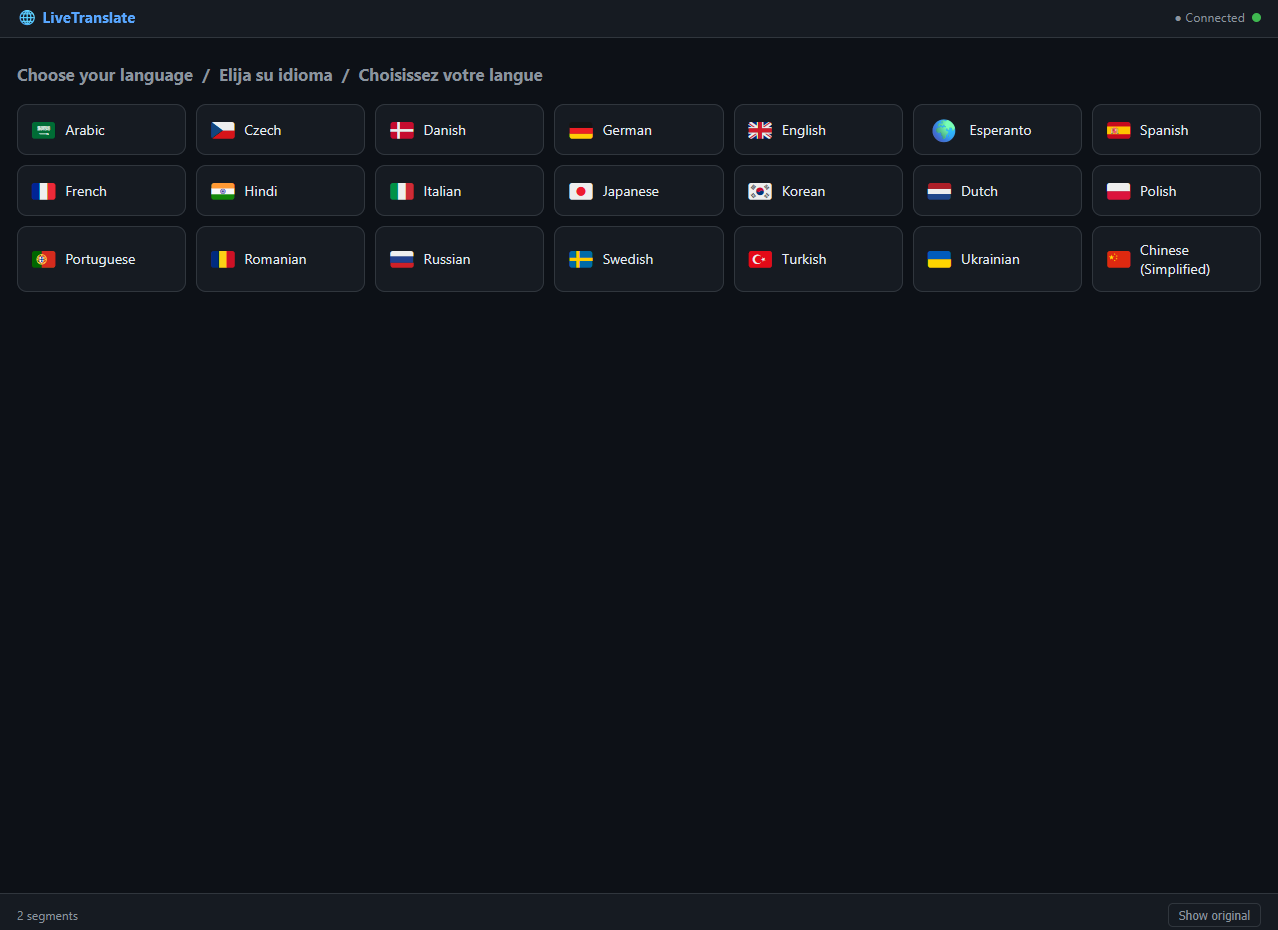
Each person scans a QR code once, picks their language, and reads along on their own screen. Nothing to install.
Everything a live, multilingual room actually needs
Not a generic transcription tool — the details are tuned for services, sermons, meetings, and classrooms alike.
Any language, live
Speech recognition covers 46+ languages, and translation works between any two you've installed — automatically, via an English pivot.
Genuinely offline
No cloud service is involved while your event is live. Internet is only needed for setup and the one-time license activation.
Live event controls
Mic gain, pause sensitivity, and custom vocabulary — names, places, liturgical or technical terms — are all adjustable mid-event, no restart needed. An optional profanity filter keeps captions clean when that matters to you.
Take the transcript home
Every session is saved automatically and exportable as plain text, subtitles, a spreadsheet, or a Word document.
Share with a glance
A QR code on the screen is the whole onboarding flow. Scan it, pick a language, done — no app, no account.
Put it on the big screen
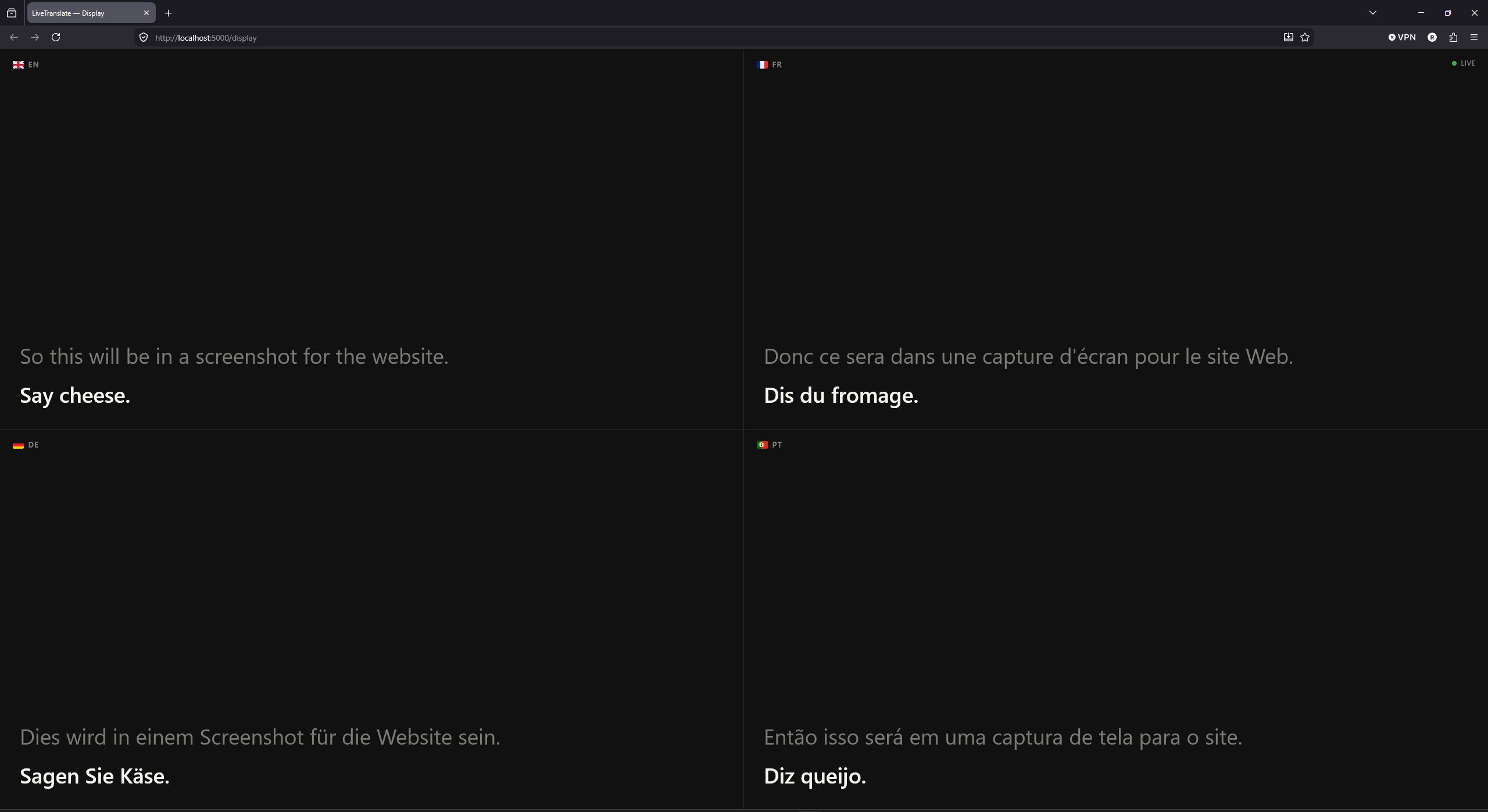
An optional display window drags onto a projector or second monitor, showing large, room-scale captions in up to four languages at once — separate from the admin panel and everyone's phones.
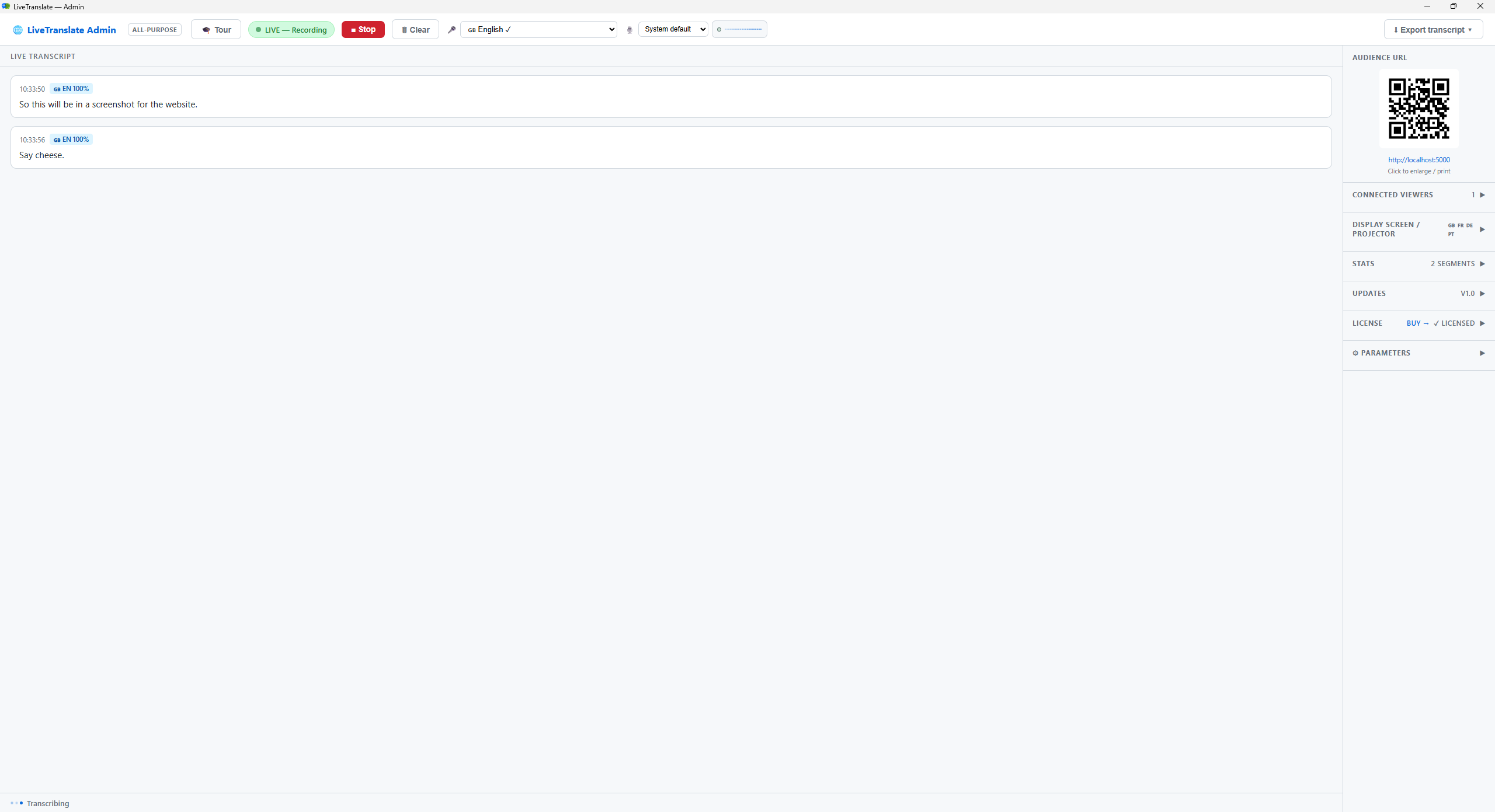
What's actually on screen during a live session
The preview up top is built to load fast on this page. Here's what the real admin panel and the real phone view look like — drop in your own captures below.
Be the first voice here
LiveTranslate is new enough that this space is still empty, on purpose — we're not going to put words in anyone's mouth.
Run an event with it, then tell us how it went. The first few real quotes go right here.
Share your experienceOne license. One computer. No subscription.
Start free, no time limit — upgrade whenever you're ready. Everything you set up carries over.
Download and use LiveTranslate free, forever — captions carry a small watermark and sessions cap at 25 caption segments. A single license removes both and unlocks full functionality on one computer, permanently.
- ✓ Full functionality — no watermark, no session cap
- ✓ All 46+ languages included
- ✓ Runs fully offline once set up
- ✓ Windows, macOS, and Linux builds included
- ✓ Transcript export — txt, srt, csv, Word
Run the installer and click through the setup wizard — choose your languages, confirm the firewall exception, done.
Open the .dmg and drag LiveTranslate.app into the Applications folder shown alongside it.
First time opening LiveTranslate? This build isn't signed with an Apple Developer certificate yet, so Gatekeeper will block the first launch. Right-click the app → Open → click "Open" in the dialog that appears. Only needed once. You'll also see the normal microphone-permission prompt — grant it when asked.
No installer — make it executable and run it:
chmod +x LiveTranslate-Linux.AppImage
./LiveTranslate-Linux.AppImage
Having trouble?
Some minimal or container-based Linux setups don't have FUSE installed, which AppImages normally need. If you see a FUSE-related error, run it with this instead:
./LiveTranslate-Linux.AppImage --appimage-extract-and-run
Local taxes may apply and are calculated at checkout. Payment processed securely by Lemon Squeezy. One license unlocks whichever platform you install it on.
Before you press Start
Only twice: once during setup to download language packs and the speech model, and once to activate your license key. After that, it runs completely offline — including during a live event.
LiveTranslate runs on Windows, macOS, and Linux, and every build is CPU-only — no GPU or special hardware needed. It runs comfortably on an ordinary laptop or desktop.
No. Speech recognition and translation both run on the same PC LiveTranslate is installed on. Nothing is uploaded, streamed, or logged externally.
The free tier works forever, with no credit card required — captions carry a small watermark and each session is capped at 25 caption segments. A one-time license removes both and unlocks full functionality on that installation, permanently. Nothing about your setup is lost when you upgrade — settings and saved transcripts carry over the moment you activate.
Choose any of the 46+ languages during setup. You can add more later at any time by re-running the installer.
No. Setup asks whether you're running a church service or a general meeting, conference, or classroom, and starts you off with sensible defaults either way — mic sensitivity, vocabulary hints, and the profanity filter. Everything stays fully adjustable afterward regardless of which you pick.
Yes. A separate display window can be dragged onto a projector or second monitor, showing large captions in up to four languages at once — alongside the phone captions, not instead of them.
Email support@getlivetranslate.com with your license details and we'll move your license to the new machine for you.
LiveTranslate ships as a Windows installer (.exe), a macOS disk image (.dmg), or a Linux AppImage — pick whichever matches your computer. All three are CPU-only builds, so no NVIDIA GPU or CUDA setup is needed.